

• Home
  • Reviews
  • Featured
  • Archives
  • Videos
  • Devices
  • Send Tips
  • Contact
  • AndroidCommunity on Twitter AndroidCommunity on Facebook AndroidCommunity on Google+ AndroidCommunity RSS Feed

Android Community

    • MUST READ

      STORIES

    • Android 4.3 leaks on video with new camera UI

      May 24, 2013

    • HTC One ‘Senseless Edition’ could arrive this summer

      May 23, 2013

    • Verizon HTC One reality returns as DROID DNA offer pops up

      May 20, 2013

  • Trending Topics
  • Jelly Bean
  • NVIDIA
  • Galaxy S 4
  • HTC One
  • Nexus 7
  • Tegra
  • Sell Your Used Phone

Motorola Droid X: Root the Easy Way

1
  • By Evan Selleck
  • on 27 Jul, 2010

Motorola Droid X: Root the Easy Way

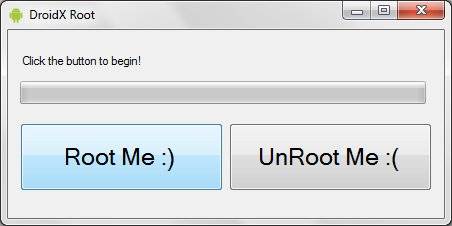
We’ve already told you that the Droid X is rooted. In fact, we gave you some pretty good instructions on how to do it. But, not everyone out there wants to get into the ADB shell and put in some command line. And we know where you’re coming from. So, if you’re still interested in rooting your brand new device and getting rid of some of that bloatware, here’s an easy method. Yes. It’s easy. Like, one click easy.

Thanks to a few folks over at AllDroid, you now get an EasyRoot method, where it just takes one click to let the software either root, or unroot your Droid X. See? We told you it was easy. It just takes a quick download, and then you’ll be good to go with whatever you want to do. Of course, now that it’s legal to root your phone, who wouldn’t want to take advantage of this? And, if you do, let us know in the comments.

[via AllDroid]

Share
  • New Nexus 7 reportedly shipping now, launching next month
  • HTC One with a larger 5-inch display coming soon
  • Android 4.3 leaks on video with new camera UI

Tags: motorolaMotorola Droid Xroot

  • muffin

    What version android does this root? is this only for 2.1?

  • Search

  • REVIEWS

    • AT&T LG Optimus G Pro ReviewAT&T LG Optimus G Pro Review
    • Iron Man 3 game Review: what you need to knowIron Man 3 game Review: what you need to know
    • Samsung GALAXY S 4 ReviewSamsung GALAXY S 4 Review
    • Samsung Galaxy Note 8.0 ReviewSamsung Galaxy Note 8.0 Review
    • Pebble review: Two weeks with a smartwatchPebble review: Two weeks with a smartwatch
  • HANDS-ON & QUICK LOOKS

    • Coolpad Quattro II 4G and 8920 hands-onCoolpad Quattro II 4G and 8920 hands-on
    • Kyocera Hydro XTRM and EDGE hands-onKyocera Hydro XTRM and EDGE hands-on
    • Opera for Android exits beta, we go hands onOpera for Android exits beta, we go hands on


  • T-Mobile G1 Accessories
  • RECENT COMMENTS

  • About
  • Contact
  • Terms of Use
  • Privacy Policy
  • Advertise

Copyright 2013 Android Community






