

• Home
  • Reviews
  • Featured
  • Archives
  • Videos
  • Devices
  • Tegra
  • Send Tips
  • Contact
  • AndroidCommunity on Twitter AndroidCommunity on Facebook AndroidCommunity on Google+ AndroidCommunity RSS Feed

Android Community

    • MUST READ

      STORIES

    • Verizon HTC One reality returns as DROID DNA offer pops up

      May 20, 2013

    • Student wins science fair with 30-second phone battery charger

      May 20, 2013

    • Hangouts set to be the future of Google Voice

      May 20, 2013

  • Trending Topics
  • Jelly Bean
  • NVIDIA
  • Galaxy S 4
  • HTC One
  • Nexus 7
  • Sell Your Used Phone

Mocana’s NanoPhone offers security options for the Android platform

3
  • By Staff Editor
  • on 16 Dec, 2008

Mocana’s NanoPhone offers security options for the Android platform

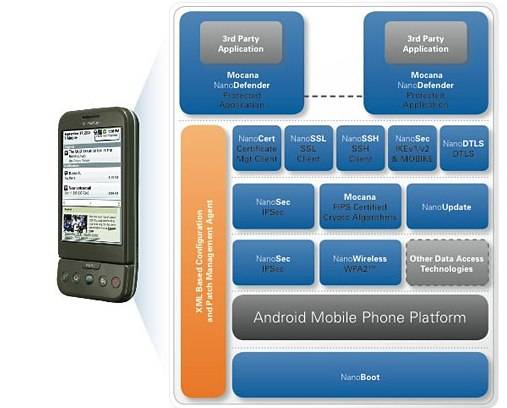
Mocana has announced the NanoPhone security suite for the Android mobile platform. With NanoPhone users can add a much-needed firewall, encryption features and VPN to Android-powered handsets without compromising performance or battery life.

With smartphones there is always the question of whether or not you are secure, especially with disclaimers in applications that should be more than secure such as the new Visa app. Google has already tried to fix security issues that users are having with the T-Mobile G1, but have been reportedly been unsuccessful.

Many users these days are forced between security and usability when shopping for a new smartphone. The Android platform has already become a target for attackers. “We hope to encourage the adoption of Android by the enterprise and by security-conscious consumers by giving developers the critical security components they need to protect Android smartphones, their users and the information that resides on them,” said Adrian Turner, CEO of Mocana.

NanoPhone hopes to increase the security of the Android platform by incorporating these key security features:

  • Virtual Private Network (VPN) clients to secure data communications between the device and corporate network;
  • Voice, video and data encryption (in transit and at rest) with FIPS-validated crypto;
  • Comprehensive malware and virus protection with no false positives;
  • A higher performance, more secure browser for ecommerce and online banking applications;
  • Scalable and secure firmware updating and secure boot capabilities;
  • Robust certificate handling features to authenticate devices, network services and individuals to each other.
[youtube]http://www.youtube.com/watch?v=9IwYLkjJXJA[/youtube]

Share
  • Hisense Sero 7 Pro with Tegra 3, Android 4.2 takes on Google's Nexus 7
  • Student wins science fair with 30-second phone battery charger
  • Google H840 media streamer hits the FCC to replace the Nexus Q

Tags: 3rd Party Applicationsandroid ossecurity

  • Search

  • REVIEWS

    • AT&T LG Optimus G Pro ReviewAT&T LG Optimus G Pro Review
    • Iron Man 3 game Review: what you need to knowIron Man 3 game Review: what you need to know
    • Samsung GALAXY S 4 ReviewSamsung GALAXY S 4 Review
    • Samsung Galaxy Note 8.0 ReviewSamsung Galaxy Note 8.0 Review
    • Pebble review: Two weeks with a smartwatchPebble review: Two weeks with a smartwatch
  • HANDS-ON & QUICK LOOKS

    • Google+ Hangouts app goes live, we go hands-onGoogle+ Hangouts app goes live, we go hands-on
    • Flipboard magazines arrive with v2.0 update, we go hands-onFlipboard magazines arrive with v2.0 update, we go hands-on
    • Lenovo IdeaCentre Horizon hands-on with BlueStacks for Android gamingLenovo IdeaCentre Horizon hands-on with BlueStacks for Android gaming


  • T-Mobile G1 Accessories
  • RECENT COMMENTS

  • About
  • Contact
  • Terms of Use
  • Privacy Policy
  • Advertise

Copyright 2013 Android Community






