

• Home
  • Reviews
  • Featured
  • Archives
  • Videos
  • Devices
  • Tegra
  • Send Tips
  • Contact
  • AndroidCommunity on Twitter AndroidCommunity on Facebook AndroidCommunity on Google+ AndroidCommunity RSS Feed

Android Community

    • MUST READ

      STORIES

    • Verizon HTC One reality returns as DROID DNA offer pops up

      May 20, 2013

    • Student wins science fair with 30-second phone battery charger

      May 20, 2013

    • Hangouts set to be the future of Google Voice

      May 20, 2013

  • Trending Topics
  • Jelly Bean
  • NVIDIA
  • Galaxy S 4
  • HTC One
  • Nexus 7
  • Sell Your Used Phone

LG demos dual-recording feature on the Optimus G Pro

0
  • By Robert Nelson
  • on 21 Feb, 2013

LG demos dual-recording feature on the Optimus G Pro

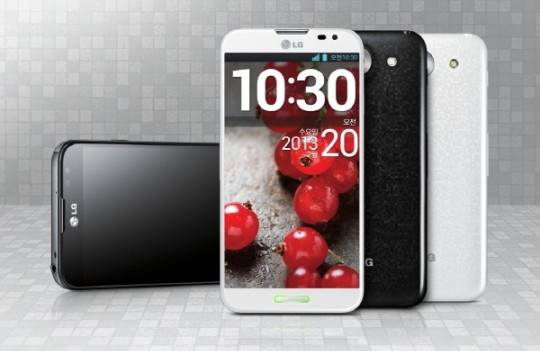
LG has recently been sharing details about the Optimus G Pro. These have included the specs and even an idea as to when we can expect the global roll-out to begin. That will be happening during the second quarter, however while we wait, it looks like some of the software features are now being shown off in video teasers.

lg-optimus-g-pro

Two of these software features are camera related. One deals with video recording and the other deals with regular stills. The former is called dual-recording and the latter is called VR panorama and both names likely give a clue as to what they do. Beginning with the dual-recording, you can see this in a demo in the video below. Basically, what it will do is allow you to record using the front and rear-facing camera at the same time. Judging from the video, it looks like you will be able to move the in-picture recording box around and even adjust the size a bit.

Next up is the VR panorama video, which judging from what we can see — looks to be the ability to capture panorama images but also capture images similar to what you would get using Photo Sphere. Basically, press the capture button and begin moving your smartphone across the group or scene. LG also demos how you can then view and scroll around that image on your smartphone or even print it out for a poster sized wall print. You can get a look at these in the video below.

All said and done, while both are neat features, we do have to wonder how much real world use they would actually get. Simply put, they are neat, but also sort of a gimmick. Speaking personally, while I have played with panorama and Photo Sphere images, I have yet to actual capture either on a regular basis. How about it, anyone using Photo Sphere or capturing panorama images on a regular basis?


Story Timeline

  • LG Optimus G Pro announced with 1080p display and quad-core processor
  • LG Optimus G heads to Australia with LTE early next month
  • LG Optimus G Pro image leaks along with updated specs
  • LG Optimus G Pro confirmed to have a 5.5-inch display
  • LG Optimus G Pro features a curved glass display
  • LG Optimus G Pro global release to begin in Q2
Share
  • Student wins science fair with 30-second phone battery charger
  • Hisense Sero 7 Pro with Tegra 3, Android 4.2 takes on Google's Nexus 7
  • Google H840 media streamer hits the FCC to replace the Nexus Q

Tags: AndroidGoogleLGLG OptimusLG Optimus G Pro

  • Search

  • REVIEWS

    • AT&T LG Optimus G Pro ReviewAT&T LG Optimus G Pro Review
    • Iron Man 3 game Review: what you need to knowIron Man 3 game Review: what you need to know
    • Samsung GALAXY S 4 ReviewSamsung GALAXY S 4 Review
    • Samsung Galaxy Note 8.0 ReviewSamsung Galaxy Note 8.0 Review
    • Pebble review: Two weeks with a smartwatchPebble review: Two weeks with a smartwatch
  • HANDS-ON & QUICK LOOKS

    • Google+ Hangouts app goes live, we go hands-onGoogle+ Hangouts app goes live, we go hands-on
    • Flipboard magazines arrive with v2.0 update, we go hands-onFlipboard magazines arrive with v2.0 update, we go hands-on
    • Lenovo IdeaCentre Horizon hands-on with BlueStacks for Android gamingLenovo IdeaCentre Horizon hands-on with BlueStacks for Android gaming


  • T-Mobile G1 Accessories
  • RECENT COMMENTS

  • About
  • Contact
  • Terms of Use
  • Privacy Policy
  • Advertise

Copyright 2013 Android Community





