

Google Docs has just received a much needed update today in the market that is aiming at Android Honeycomb tablets. We have a brand new layout and enhanced user interface for tablets as well as a 3-panel interface for easy viewing of documents on the larger 7 & 10.1″ displays. More update details after the break.
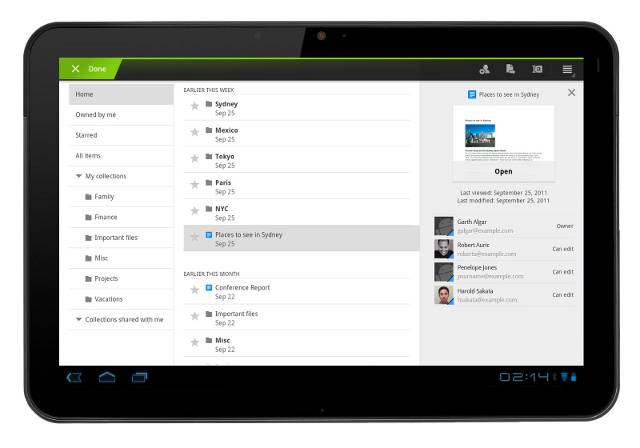
the new 3-panel view makes great use of the added 10.1″ real estate a tablet has to offer. Showing all of your docs neatly on the page, giving you more details to the side and even a mini preview if needed to speed up searching for that one document. These features have been lacking in the mobile version and its great to see this update finally arrive. Here’s how it now looks on tablets.

The update provides plenty of stability improvements and bug fixes as usual, as well as adding some video playback improvements too. Here’s the full list
– Optimized experience for tablet users, Honeycomb (Android 3.0+)
– New 3-panel interface for improved browsing
– Details panel showing a thumbnail and sharing information
– Improved sharing experience with autocomplete system
– Landscape or portrait mode
– Improved video playback
As the Android tablet market continues to grow we will keep seeing great applications to support them. Now I just need Google to release a dedicated Google+ application for Honeycomb and I’ll be happy. As usual the update is available now in the Android Market so head on down and give it a try by clicking here.








You do realize that no all Honeycomb tablets are 10.1 inches… right?
not*
yea.. lulz
This update was an amazing graphical update, but Im still waiting on an enhanced editing experience. There are android apps that edit documents but I want Google to add more functionality to its mobile (and tablet) editing experience.
This would be very important to me as I use my tablet more then my laptop now simply because of its increased mobility. And I highly enjoy the keyboard actually but i wish that the tablet editing portion had more features and hopefully in-app instead of linking to a website. Typing through the browser app always has keyboard lag in comparison to apps like gmail and Google voice