

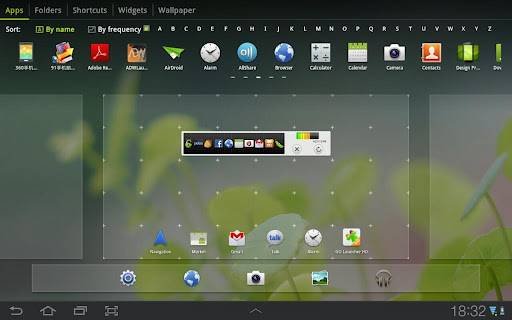
There’s no shortage of custom launcher apps for your Android smartphone, but when it comes to tablets, options have been somewhat lacking for the better part of a year. One of the first to release a true tablet launcher comes from a familiar place: the Go Launcher team. Their new app, titled Go Launcher HD for Pad, is designed for Honeycomb and Ice Cream Sandwich tablets, and it’s a free download in the Google Play Store. If you’re looking for something beyond the standard launcher that’s built for tablets from the ground up, you should check it out.
The standard bells and whistles are present, including customizable home screens and animations, a new interface for adding icons and widgets, and more settings than you can shake a capacitive stylus at. It keeps the basic layout and structure of the Honeycomb/ICS launcher, but adds in a special section for GO’s extensive collection of free and paid widgets. In a nod towards the smartphone version of the launcher, there’s an option for a persistent set of docked shortcuts along the bottom row that are customizable, not unlike the tray icons in Samsung’s Galaxy Tab series.
Early reaction is mixed. While most are happy to see another launcher option for Android tablets, many have reported stability issues with the early release. Expect this to improve, as the app is only at version 1.01 at the moment (the latest release was today, as a matter of fact). Other small complaints include ICS-style automatic folders and a few widget incompatibilities. Note that GO Launcher HD is only for tablets; even smartphones that run Ice Cream Sandwich won’t be able to install it from the Google Play Store.








Replaced the stock honeycomb launcher with this. True, stability is a small issue after heavy use and also the process seems to have a higher priority (which eliminates lag but drains the battery), still I like it very much. Can resize ANY widget even the ones that you normally couldn’t!!!
I tried it for a while until it crashed my Gtab 10.1. I had to do factory reset to make it work again. I would steer clear of it.
GO Launcher HD is the exclusive tablet version of GO Launcher EX on
Android platform. It brings you with the fascinating interface,
practical utilities, as well as extremely personalized and smooth
operating experience.
Absolutely flawless design for a blog. I am giving my first comment here though
I have been reading it for past few weeks. The data presented here are relevant and
precise I think. You should be concentrating more on the outlay. Good job though.