

• Home
  • Reviews
  • Featured
  • Archives
  • Videos
  • Devices
  • Send Tips
  • Contact
  • AndroidCommunity on Twitter AndroidCommunity on Facebook AndroidCommunity on Google+ AndroidCommunity RSS Feed

Android Community

    • MUST READ

      STORIES

    • Android 5.0 ‘Key Lime Pie’ Concept Design has us dreaming for the future

      June 18, 2013

    • Huawei Ascend P6 official as world’s thinnest smartphone

      June 18, 2013

    • Kazam created by ex-HTC execs, aimed for European market

      June 17, 2013

  • Trending Topics
  • Jelly Bean
  • NVIDIA
  • Galaxy S 4
  • HTC One
  • Nexus 7
  • Tegra
  • Sell Your Used Phone

Froyo on the Motorola Defy can do 720 playback and record

1
  • By James DeRuvo
  • on 7 Feb, 2011

Froyo on the Motorola Defy can do 720 playback and record

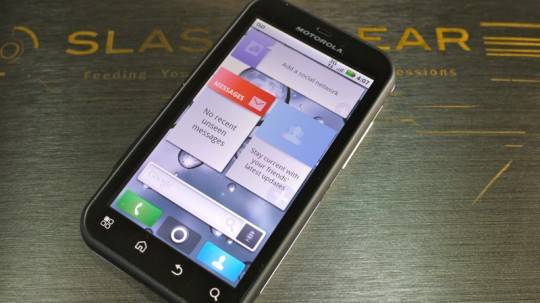
A member of the XDA Developers forums known as “-={antibyte}=-“, has managed to get his Motorola Defy to playback 720p HD video using Android 2.2 (Froyo).  And not only that, he was also able to get it to record full screen with a resolution of 848×480.  How he was able to accomplish this experiment  was by using “adb” to install the playback file and folder to /system/lib directory.  But he warns that it’s not for the faint of heart.

The forum member also warns that before doing anything like this yourself, that it’s only performed with Froyo and the understanding that it hasn’t been testing on any other handset.  In addition, users are well advised to backup everything before trying.   And those hoping to use “Recovery” to install the mod will have little luck.   But giving HD playback to Froyo is a pretty cool step.

More details on the procedure can be found at the forum post here.

[Via XDA Developers]

Share
  • Android 5.0 'Key Lime Pie' Concept Design has us dreaming for the future
  • Google Now wallpapers in full-size available now for all
  • Minuum Keyboard ready for beta testing - aims to change how we type

Tags: 720pAndroid 2.2 (Froyo)Motorola Defy

  • http://twitter.com/JamesJ11487 James J

    I have recently ordered this phone, and couldn’t be more excited! The resolution looks amazing! The first thing I will be installing is the DISH Network Remote access App! I have access to more than 200 channels in HD streamed LIVE to my android phone! As an employee for DISH, I know that DirecTV does not have this ability. With as many this much access to HD, I know this phone is going to be the perfect match.

  • Search

  • REVIEWS

    • Sony Xperia ZL ReviewSony Xperia ZL Review
    • GALAXY S 4 Tech21 Impact Mesh case reviewGALAXY S 4 Tech21 Impact Mesh case review
    • AT&T LG Optimus G Pro ReviewAT&T LG Optimus G Pro Review
    • Iron Man 3 game Review: what you need to knowIron Man 3 game Review: what you need to know
    • Samsung GALAXY S 4 ReviewSamsung GALAXY S 4 Review
  • HANDS-ON & QUICK LOOKS

    • Qualcomm Snapdragon 800 series developer platform first lookQualcomm Snapdragon 800 series developer platform first look
    • Huawei Ascend P6 “Beauty Shot” hands-on demo shows smooth-skin oddityHuawei Ascend P6 “Beauty Shot” hands-on demo shows smooth-skin oddity
    • Huawei Ascend P6 hands-onHuawei Ascend P6 hands-on


  • T-Mobile G1 Accessories
  • RECENT COMMENTS

  • About
  • Contact
  • Terms of Use
  • Privacy Policy
  • Advertise

Copyright 2013 Android Community






