

• Home
  • Reviews
  • Featured
  • Archives
  • Videos
  • Devices
  • Tegra
  • Send Tips
  • Contact
  • AndroidCommunity on Twitter AndroidCommunity on Facebook AndroidCommunity on Google+ AndroidCommunity RSS Feed

Android Community

    • MUST READ

      STORIES

    • Otterbox Defender and Commuter GALAXY S 4 case hands-on

      May 20, 2013

    • Verizon HTC One reality returns as DROID DNA offer pops up

      May 20, 2013

    • Student wins science fair with 30-second phone battery charger

      May 20, 2013

  • Trending Topics
  • Jelly Bean
  • NVIDIA
  • Galaxy S 4
  • HTC One
  • Nexus 7
  • Sell Your Used Phone

Eee Pad Transformer website launched

6
  • By James DeRuvo
  • on 4 Apr, 2011

Eee Pad Transformer website launched

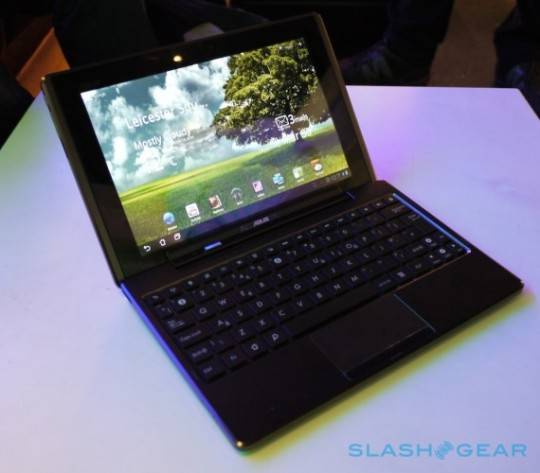
Asus has launched it’s web portal for their upcoming eeePC Transformer tablet. The site appears to be using the computer’s optional docking station as it’s centerpiece with the slogan “My Multiple Life, I decide.” The main image shows the Transformer sliding into the docking station with keyboard to become a complete laptop solution. The dock also provides for longer battery life, up to 16 hours, over the 9.5 hours just on the tablet battery.

The Transformer will come with Polaris Office 3.0, a suite of office programs for document creation, spreadsheets, and presentations. It’s also powered by Asus own Waveshare UI overlaying Android 3.0 (Honeycomb). And the Transformer is also embracing the cloud with applications such as MyCloud,MyNet, and MyLibrary to take advantage of the free year of Unlimited Asus WebStorage that is coming with the tablet. MyNet is Asus media streaming utility for home network applications, while MyCloud is linked for media storage and will allow for access from any PC or Mac.

The Transformer’s specs are pretty straight up, Tegra 2 Processor with 1GB RAM, 10.1 IPS capacitive touch screen, front and rear facing cameras, 5.1 surround sound stereo speakers, and HDMI port. And along with the optional dock comes two USB ports and SD and Micro SD card readers. The IPS touch screen also offers an ultra-wide 178⁰ viewing angle and is made from scratch resistant glass. You can check out SlashGear’s hands-on here.

[via SlashGear]
Share
  • Student wins science fair with 30-second phone battery charger
  • Hisense Sero 7 Pro with Tegra 3, Android 4.2 takes on Google's Nexus 7
  • Verizon HTC One reality returns as DROID DNA offer pops up

Tags: Android 3.0 (Honeycomb)Android HoneycombAsusASUS Eee Pad TransformerBest BuyGoogle

  • http://www.facebook.com/people/Omega-Man/100000590156587 Omega Man

    That display is beautiful…but 1280 x 600??? really?

    • Anonymous

      not really! 1280×800

    • http://profiles.google.com/sciencekid66 John Conley

      silly brit. yes, its 1280×800.

  • Sdtriathlete

    So where is the link to that ASUS web site about it? WTF?

  • Sdtriathlete

    So where is the link to that ASUS web site about it? WTF?

  • onthefence

    WHAT! Why did they put the USB ports in the keyboard?!?!?!? What were they smoking? That means that if you undock it, you can’t connect any external storage to it? This may be a design deal breaker.

    Also, why did they remove the physical keys, like menu, back, home? Software keys are annoying. Not everyone thinks Apple got it right with the iPad. Why imitate them so much?

    G1 is the best android design yet. From there, downhill.

  • Search

  • REVIEWS

    • AT&T LG Optimus G Pro ReviewAT&T LG Optimus G Pro Review
    • Iron Man 3 game Review: what you need to knowIron Man 3 game Review: what you need to know
    • Samsung GALAXY S 4 ReviewSamsung GALAXY S 4 Review
    • Samsung Galaxy Note 8.0 ReviewSamsung Galaxy Note 8.0 Review
    • Pebble review: Two weeks with a smartwatchPebble review: Two weeks with a smartwatch
  • HANDS-ON & QUICK LOOKS

    • Google+ Hangouts app goes live, we go hands-onGoogle+ Hangouts app goes live, we go hands-on
    • Flipboard magazines arrive with v2.0 update, we go hands-onFlipboard magazines arrive with v2.0 update, we go hands-on
    • Lenovo IdeaCentre Horizon hands-on with BlueStacks for Android gamingLenovo IdeaCentre Horizon hands-on with BlueStacks for Android gaming


  • T-Mobile G1 Accessories
  • RECENT COMMENTS

  • About
  • Contact
  • Terms of Use
  • Privacy Policy
  • Advertise

Copyright 2013 Android Community







