

• Home
  • Reviews
  • Featured
  • Archives
  • Videos
  • Devices
  • Tegra
  • Send Tips
  • Contact
  • AndroidCommunity on Twitter AndroidCommunity on Facebook AndroidCommunity on Google+ AndroidCommunity RSS Feed

Android Community

    • MUST READ

      STORIES

    • Android 4.3 leaks on video with new camera UI

      May 24, 2013

    • HTC One ‘Senseless Edition’ could arrive this summer

      May 23, 2013

    • Verizon HTC One reality returns as DROID DNA offer pops up

      May 20, 2013

  • Trending Topics
  • Jelly Bean
  • NVIDIA
  • Galaxy S 4
  • HTC One
  • Nexus 7
  • Sell Your Used Phone

Dropbox introduces new photos tab to show off your pictures

0
  • By Dave LeClair
  • on 12 Oct, 2012

Dropbox introduces new photos tab to show off your pictures

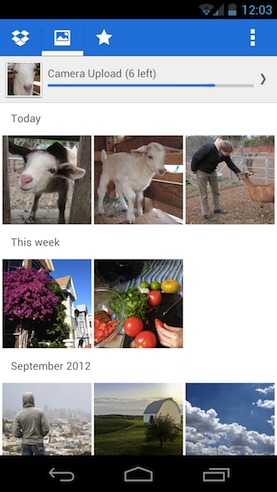
Dropbox has just rolled out a brand new version of its Android app that is designed to put your photos front and center. Dropbox just announced the new version on its blog. Instead of hiding your photos away with the rest of your files, this new version of Dropbox has a photos tab where photographs are the focal point. It is designed to allow users to view and share their photos in a snap (pun intended).


As part of this update, they moved uploads to the menu in the file browser. This allowed them to keep the same number of tabs and not change the look and feel of the application while adding this new emphasis on photos. If you are concerned with the uploads tab missing, take a deep breath and check there, and your mind shall be set at ease.

Dropbox is clearly focusing on photos. Version 4.1 of its Android app added the ability to automatically upload photos over Wi-Fi and cellular data in the background. Dropbox prioritized this new feature so much that it offered users 3GB of additional storage just for enabling this new feature on their devices.

Dropbox’s camera uploads feature shows off photos uploaded from any device, so with this new photos tab, you will be able to see all your pics uploaded on this screen, regardless of where you took them. It makes it much easier to find your pictures and share them with the world. Version 4.2, is available now from Google Play. Let us know in the comments how you enjoy this new feature from Dropbox.


Story Timeline

  • Dropbox supporting Android 4.0 optimizations hits Android Market
  • Dropbox incorporates automatic image upload into latest update
  • Google Drive revealed: Dropbox beware
  • Google Drive vs Dropbox vs Box and more
Share
  • New Nexus 7 reportedly shipping now, launching next month
  • Verizon HTC One "will be announced later"
  • HTC One with a larger 5-inch display coming soon

Tags: dropboxGoogleUpdate

  • Search

  • REVIEWS

    • AT&T LG Optimus G Pro ReviewAT&T LG Optimus G Pro Review
    • Iron Man 3 game Review: what you need to knowIron Man 3 game Review: what you need to know
    • Samsung GALAXY S 4 ReviewSamsung GALAXY S 4 Review
    • Samsung Galaxy Note 8.0 ReviewSamsung Galaxy Note 8.0 Review
    • Pebble review: Two weeks with a smartwatchPebble review: Two weeks with a smartwatch
  • HANDS-ON & QUICK LOOKS

    • Coolpad Quattro II 4G and 8920 hands-onCoolpad Quattro II 4G and 8920 hands-on
    • Kyocera Hydro XTRM and EDGE hands-onKyocera Hydro XTRM and EDGE hands-on
    • Opera for Android exits beta, we go hands onOpera for Android exits beta, we go hands on


  • T-Mobile G1 Accessories
  • RECENT COMMENTS

  • About
  • Contact
  • Terms of Use
  • Privacy Policy
  • Advertise

Copyright 2013 Android Community





