

• Home
  • Reviews
  • Featured
  • Archives
  • Videos
  • Devices
  • Send Tips
  • Contact
  • AndroidCommunity on Twitter AndroidCommunity on Facebook AndroidCommunity on Google+ AndroidCommunity RSS Feed

Android Community

    • MUST READ

      STORIES

    • Android 4.3 leaks on video with new camera UI

      May 24, 2013

    • HTC One ‘Senseless Edition’ could arrive this summer

      May 23, 2013

    • Verizon HTC One reality returns as DROID DNA offer pops up

      May 20, 2013

  • Trending Topics
  • Jelly Bean
  • NVIDIA
  • Galaxy S 4
  • HTC One
  • Nexus 7
  • Tegra
  • Sell Your Used Phone

DroidMote lets XPERIA Play owners control Android tablet games

3
  • By Michael Crider
  • on 30 Nov, 2011

DroidMote lets XPERIA Play owners control Android tablet games

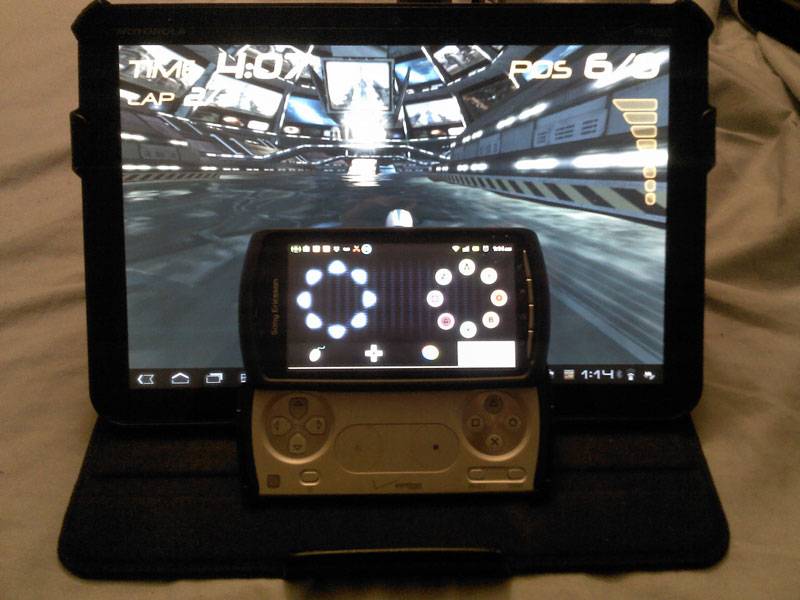
There are a lot of exciting developments in the Android gaming world, but at the end of the day, touchsceen controls are still a limiting factor for complex games. Owners of Sony’s XPERIA Play have a built-in solution, but what if you want to play your games with glorious button-mashing accuracy on a screen more than a few inches wide? If you find yourself in this conundrum, and you’ve got an enviable amount of Android hardware lying around, you might want to invest in DroidMote, an app that allows the XPERIA Play to remotely control games on any Android tablet.

The app’s been around for a while, but what’s the sense in replacing a touchscreen with a slightly smaller one, or even a cramped QWERTY keyboard? The latest update allows the XPERIA Play’s gaming buttons on its slide-out lower half to come into play. Throw in an HDMI cable and you’ve got a full-fledged mobile console, albeit one that requires about a thousand dollars worth of hardware to run properly.

Check it out in action with an HDTV setup below:

The server app runs on the tablet of your choice, and costs $2. At this point, you will unfortunately need to be rooted in order for it to work. The client app runs on the XPERIA Play, or any Android phone you’d like to use, and it’s a free download. Naturally the controls are completely customizable, allowing you to use any combination of physical and virtual buttons you like, plus tilt controls.

[device id=71] [via Droid Gamers]

Share
  • New Nexus 7 reportedly shipping now, launching next month
  • HTC One with a larger 5-inch display coming soon
  • Android 4.3 leaks on video with new camera UI

Tags: android gamesandroid tabletgaming devicerootXperia Play

  • Io

    Android is fantastic for this situation,

    nnlike Apple, which kills its products under its policies of closure

  • genny gen

    DroidMote now support also Onlive
    http://www.youtube.com/watch?v=cAqDKe7gY9E

  • Liamjjones

    is there an app that allows you to write a text message using the gamer controls…. so its similar to the xbox messenging.

  • Search

  • REVIEWS

    • AT&T LG Optimus G Pro ReviewAT&T LG Optimus G Pro Review
    • Iron Man 3 game Review: what you need to knowIron Man 3 game Review: what you need to know
    • Samsung GALAXY S 4 ReviewSamsung GALAXY S 4 Review
    • Samsung Galaxy Note 8.0 ReviewSamsung Galaxy Note 8.0 Review
    • Pebble review: Two weeks with a smartwatchPebble review: Two weeks with a smartwatch
  • HANDS-ON & QUICK LOOKS

    • Coolpad Quattro II 4G and 8920 hands-onCoolpad Quattro II 4G and 8920 hands-on
    • Kyocera Hydro XTRM and EDGE hands-onKyocera Hydro XTRM and EDGE hands-on
    • Opera for Android exits beta, we go hands onOpera for Android exits beta, we go hands on


  • T-Mobile G1 Accessories
  • RECENT COMMENTS

  • About
  • Contact
  • Terms of Use
  • Privacy Policy
  • Advertise

Copyright 2013 Android Community






