

• Home
  • Reviews
  • Featured
  • Archives
  • Videos
  • Devices
  • Send Tips
  • Contact
  • AndroidCommunity on Twitter AndroidCommunity on Facebook AndroidCommunity on Google+ AndroidCommunity RSS Feed

Android Community

    • MUST READ

      STORIES

    • HTC Butterfly S official: UltraPixel Camera, BoomSound, 5-inch display

      June 19, 2013

    • Android 5.0 ‘Key Lime Pie’ Concept Design has us dreaming for the future

      June 18, 2013

    • Huawei Ascend P6 official as world’s thinnest smartphone

      June 18, 2013

  • Trending Topics
  • Jelly Bean
  • NVIDIA
  • Galaxy S 4
  • HTC One
  • Nexus 7
  • Tegra
  • Sell Your Used Phone

DROID Charge Receives OTA Update at Launch

3
  • By Chris Burns
  • on 17 May, 2011

DROID Charge Receives OTA Update at Launch

This mystical magical phone manufactured by Samsung and released by Verizon as the DROID Charge has been an object of some mystery as of late, having been sent out to reviewers (including Android Community) earlier than launch, a bit of a delay affecting the launch, then the device launching nationwide over this past weekend at locations like Verizon standalone stores as well as Target’s mobile section. Now, not a few days after its official sending-off party, the DROID Charge has its first over the air update. It’s not too big, but you should sure download it.

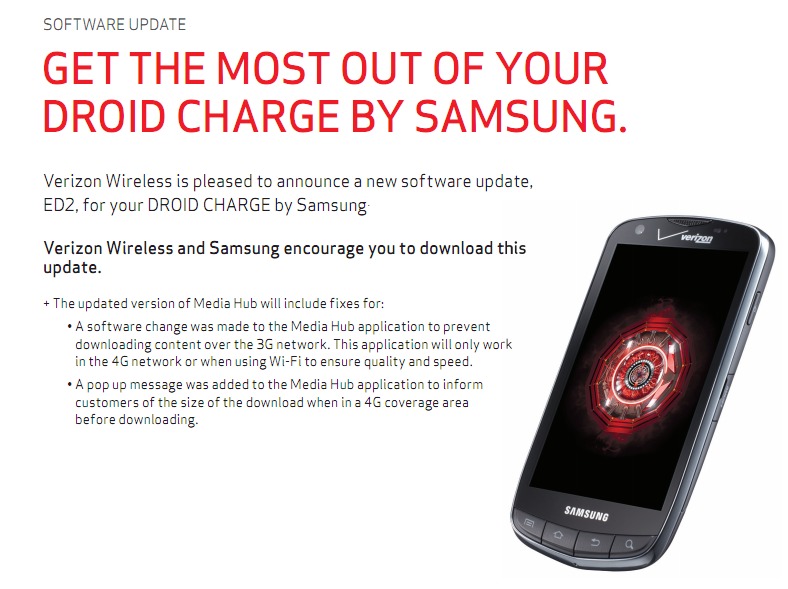
We’ve literally just loaded the update in less than five minutes and again, so should you. This update does a couple of things that you might find interesting, listed in the text and flyer below:

• A software change was made to the Media Hub application to prevent downloading content over the 3G network. This application will only work in the 4G network or when using Wi-Fi to ensure quality and speed.

• A pop up message was added to the Media Hub application to inform customers of the size of the download when in a 4G coverage area before downloading.

To get this download if you’ve not already seen it pop up on your phone automatically, head to Home” > “Menu” > “Settings” > “About phone” > “System updates”. There you’ll be greeted by the screen above and you’ll have a gay ol’ time moving on up.


Share
  • Android 5.0 'Key Lime Pie' Concept Design has us dreaming for the future
  • Qualcomm Snapdragon 800 series quad-core benchmarks: This thing is fast
  • Minuum Keyboard ready for beta testing - aims to change how we type

Tags: droidGoogleotaSamsung Droid ChargeSamsung media hub

  • http://profiles.google.com/nwalk7800 Nicholas Walker

     Why would I want an update that would remove features?

    • http://androidcommunity.com/ Chris Burns

      I have the same question. 

  • Firstcatch24

    I just got this phone yesterday. I love the screen & battery life. But the update ruins the phone for me. I don’t live in a 4g area. This update has made the phone useless outside of the 4g area. All you can do is talk & text if you are out & about. You can’t check Facebook, find a restaurant, or essentially do anything useful that a smart phone is meant to do. Returning it after less than 24 hours. Totally disappointed as this was preventable.

  • Search

  • REVIEWS

    • Sony Xperia ZL ReviewSony Xperia ZL Review
    • GALAXY S 4 Tech21 Impact Mesh case reviewGALAXY S 4 Tech21 Impact Mesh case review
    • AT&T LG Optimus G Pro ReviewAT&T LG Optimus G Pro Review
    • Iron Man 3 game Review: what you need to knowIron Man 3 game Review: what you need to know
    • Samsung GALAXY S 4 ReviewSamsung GALAXY S 4 Review
  • HANDS-ON & QUICK LOOKS

    • Qualcomm Snapdragon 800 series developer platform first lookQualcomm Snapdragon 800 series developer platform first look
    • Huawei Ascend P6 “Beauty Shot” hands-on demo shows smooth-skin oddityHuawei Ascend P6 “Beauty Shot” hands-on demo shows smooth-skin oddity
    • Huawei Ascend P6 hands-onHuawei Ascend P6 hands-on


  • T-Mobile G1 Accessories
  • RECENT COMMENTS

  • About
  • Contact
  • Terms of Use
  • Privacy Policy
  • Advertise

Copyright 2013 Android Community






