

• Home
  • Reviews
  • Featured
  • Archives
  • Videos
  • Devices
  • Tegra
  • Send Tips
  • Contact
  • AndroidCommunity on Twitter AndroidCommunity on Facebook AndroidCommunity on Google+ AndroidCommunity RSS Feed

Android Community

    • MUST READ

      STORIES

    • ASUS Padfone Infinity rumors point towards a U.S. release

      May 22, 2013

    • Google invites #ifihadglass applicants to try Google Glass

      May 22, 2013

    • Google Play Magazines updated with card UI to match Google Music

      May 22, 2013

  • Trending Topics
  • Jelly Bean
  • NVIDIA
  • Galaxy S 4
  • HTC One
  • Nexus 7
  • Sell Your Used Phone

CyanogenMod releases first nightly builds for the Google Nexus Q

1
  • By Robert Nelson
  • on 21 Jan, 2013

CyanogenMod releases first nightly builds for the Google Nexus Q

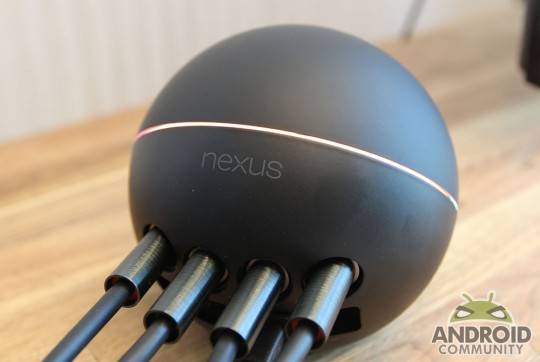
Google may have banished the Nexus Q from the Play Store a while back, however it looks like the device isn’t totally dead yet. Well, it may be in the eyes of Google, however the folks at CyanogenMod have just released the first nightly build for the media streaming device that never really took off.

Nexus-Q

That being said, the CyanogenMod nightly build for the Nexus Q is dubbed steelhead and will bring Android 4.2.1 Jelly Bean. Of course, while this may be exactly what some Nexus Q users have been waiting and hoping for, there are some catches that you will likely want to know up front.

The folks at CyanogenMod are describing this release as being “fully functional” but with one caveat. That caveat may be enough for some to stop thinking about running this nightly and sticking with the original software. The original @home functionality will no longer work once you have the nightly build up and running. Taking that a step further, it was said that is is unclear if it will ever work.

The ROM can be downloaded from the CyanogenMod website and the installation process is similar to other Nexus devices. In other words, boot into fast boot mode, unlock it and then flash the recover. Another bit worth mentioning, the navigation during the recovery process is done using the Q. You will need to rotate the ball to navigate the menu and tap when you need to select. And then once in with CyanogenMod up and running, you can navigate with a mouse — either wired or Bluetooth. All said and done, it looks like the folks at CyanogenMod have given the Nexus Q a little bit of extra life.

Story Timeline

  • Google Nexus Q media player makes its debut - just $299
  • Free Nexus 7, Nexus Q and Galaxy Nexus for IO attendees
  • Google Nexus Q Hands-on
  • Nexus Q media streamer now shipping from Play Store
  • Google updates YouTube and Nexus Q apps
  • Nexus Q wait stretches to three weeks overnight
  • Google delays launch of Nexus Q, gives free Q to those who pre-ordered
  • Google begins shipping Nexus Q pre-orders
  • Google Nexus Q banished from Nexus landing page
[device id=3067] [via Google+]
Share
  • Samsung Galaxy Note 3 with Android 4.3 spotted in benchmark results
  • Verizon HTC One running Android 4.2.2 could be coming soon
  • Verizon HTC One tipped for CTIA event unveiling

Tags: AndroidcyanogenCyanogenModGoogleGoogle Nexus Qnexus qnightliesnightly

  • http://www.facebook.com/profile.php?id=691943709 Jonne Backhaus

    Fully functional except the RJ45, Toslink and the Internal AMP do not work.

  • Search

  • REVIEWS

    • AT&T LG Optimus G Pro ReviewAT&T LG Optimus G Pro Review
    • Iron Man 3 game Review: what you need to knowIron Man 3 game Review: what you need to know
    • Samsung GALAXY S 4 ReviewSamsung GALAXY S 4 Review
    • Samsung Galaxy Note 8.0 ReviewSamsung Galaxy Note 8.0 Review
    • Pebble review: Two weeks with a smartwatchPebble review: Two weeks with a smartwatch
  • HANDS-ON & QUICK LOOKS

    • Coolpad Quattro II 4G and 8920 hands-onCoolpad Quattro II 4G and 8920 hands-on
    • Kyocera Hydro XTRM and EDGE hands-onKyocera Hydro XTRM and EDGE hands-on
    • Opera for Android exits beta, we go hands onOpera for Android exits beta, we go hands on


  • T-Mobile G1 Accessories
  • RECENT COMMENTS

  • About
  • Contact
  • Terms of Use
  • Privacy Policy
  • Advertise

Copyright 2013 Android Community







