

• Home
  • Reviews
  • Featured
  • Archives
  • Videos
  • Devices
  • Tegra
  • Send Tips
  • Contact
  • AndroidCommunity on Twitter AndroidCommunity on Facebook AndroidCommunity on Google+ AndroidCommunity RSS Feed

Android Community

    • MUST READ

      STORIES

    • Google H840 media streamer hits the FCC to replace the Nexus Q

      May 18, 2013

    • Google+ Hangouts app update adds tablet support

      May 17, 2013

    • Skobbler for Android update adds turn-by-turn navigation

      May 17, 2013

  • Trending Topics
  • Jelly Bean
  • NVIDIA
  • Galaxy S 4
  • HTC One
  • Nexus 7
  • Sell Your Used Phone

Chrome Beta for Android gets password sync and autofill features

0
  • By Cory Gunther
  • on 6 Mar, 2013

Chrome Beta for Android gets password sync and autofill features

For all you Chrome browser fans out there we have some great news coming right from Google regarding the beta version. They’ve just updated Chrome Beta and added a few much needed features that users have been asking and begging for since it was originally released. That being password sync and even autofill.

CHROME

All us Android users will be happy to know that our entire mobile browsing experience is about to get a whole lot better, and faster. Google’s been working hard on the Chrome Browser, and the beta version has tons of additional options and features that should be coming to the mass public soon.

Two most requested features that were surprisingly not included even with the first few updates have both arrived today. It’s too bad it took this long, but at least it’s coming soon and hopefully they’ll leave the beta and be available to all. The new features being password sync across all Chrome browsers on your devices, as well as the PC favorite feature autofill.
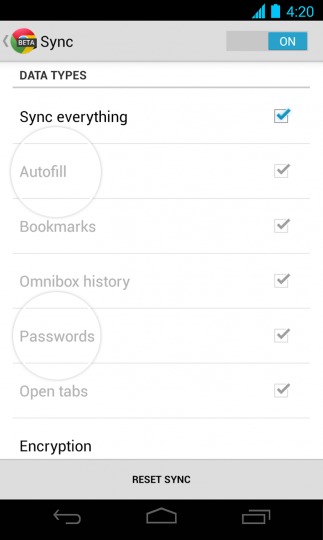
Chrome for Android Beta m26

You must be running the latest Chrome Beta (link below) and once you head into settings and head to the ‘sync’ area you’ll see both autofill and password sync is available. Go ahead and check the boxes and you’ll be enjoying it in no time. According to the Chrome Blog they also recommend running the beta on your PC too, so that’s just a reminder. The beta version is technically listed as “unstable” by Google’s standards, but should work great for most as I have zero problems with it. Enjoy the new features!

[via Play Store]

Story Timeline

  • Google releases Chrome Beta app for Android
  • Chrome Beta for Android adds support for experimental features
  • Chrome Beta for Android found to be hiding a full-screen browsing mode
  • Chrome Beta for Android update arrives with bug fixes
  • Chrome for Android update adds background audio and more
  • Android and Chrome: No merge in sight
Share
  • New Nexus 7 outed in Google Hangouts video
  • Verizon HTC One talk returns as the HTC PN073XX surfaces
  • Easter Eggs and Ponies found in the new Google Hangouts

Tags: AndroidbetaChromeChrome for AndroidGoogleSyncUpdate

  • Search

  • REVIEWS

    • AT&T LG Optimus G Pro ReviewAT&T LG Optimus G Pro Review
    • Iron Man 3 game Review: what you need to knowIron Man 3 game Review: what you need to know
    • Samsung GALAXY S 4 ReviewSamsung GALAXY S 4 Review
    • Samsung Galaxy Note 8.0 ReviewSamsung Galaxy Note 8.0 Review
    • Pebble review: Two weeks with a smartwatchPebble review: Two weeks with a smartwatch
  • HANDS-ON & QUICK LOOKS

    • Google+ Hangouts app goes live, we go hands-onGoogle+ Hangouts app goes live, we go hands-on
    • Flipboard magazines arrive with v2.0 update, we go hands-onFlipboard magazines arrive with v2.0 update, we go hands-on
    • Lenovo IdeaCentre Horizon hands-on with BlueStacks for Android gamingLenovo IdeaCentre Horizon hands-on with BlueStacks for Android gaming


  • T-Mobile G1 Accessories
  • RECENT COMMENTS

  • About
  • Contact
  • Terms of Use
  • Privacy Policy
  • Advertise

Copyright 2013 Android Community






