

• Home
  • Reviews
  • Featured
  • Archives
  • Videos
  • Devices
  • Tegra
  • Send Tips
  • Contact
  • AndroidCommunity on Twitter AndroidCommunity on Facebook AndroidCommunity on Google+ AndroidCommunity RSS Feed

Android Community

    • MUST READ

      STORIES

    • Google H840 media streamer hits the FCC to replace the Nexus Q

      May 18, 2013

    • Google+ Hangouts app update adds tablet support

      May 17, 2013

    • Skobbler for Android update adds turn-by-turn navigation

      May 17, 2013

  • Trending Topics
  • Jelly Bean
  • NVIDIA
  • Galaxy S 4
  • HTC One
  • Nexus 7
  • Sell Your Used Phone

Android Google Maps gets Latitude, voice search and transit directions

0
  • By Vincent Nguyen
  • on 16 Jun, 2009

Android Google Maps gets Latitude, voice search and transit directions

Google Maps for Android is now even better than before, thanks to new features and a few fixed issues with Google Latitude.  You can now search Google Maps for Android simply by speaking your query and Google Maps will search it for you.  Google’s voice recognition engine currently understands English in American, Australian and British accents.  Other notable features, once you find what you’re looking for, include store hours, prices, ratings, and reviews.

transit-android

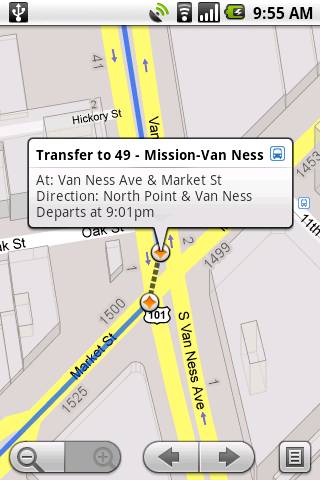
When traveling to San Francisco or New York City, I do a lot of walking and/or take public transportation.  Up until now, mapping out walking directions or transit for Google Maps for Android was sorely missing.  Thanks to the updates, these two features are available in over 250 cities, including NYC and San Francisco.

Google also improved Google Latitude by fixing an issue that caused background location updates to periodically stop for some users.  So now, once you select “Detect your location” from the Latitude privacy menu, your location will continue to update as long as your Android phone is on.  There’s also a new experimental feature called Updates that lets you connect with your friends and post messages.  To test out this new feature, start Latitude and click the “Updates” tab to broadcast your updates.

[youtube]http://www.youtube.com/watch?v=_YFw9p0TjT8[/youtube]

The upgrade isn’t pushed to your Android phones so make sure to download it in the Android Market by searching for “Google Maps” and then following the instructions.


[Google Android]
Share
  • New Nexus 7 outed in Google Hangouts video
  • Google H840 media streamer hits the FCC to replace the Nexus Q
  • Samsung says it will look into compacting Galaxy S 4 software bloat

Tags: Android ApplicationsAndroid-MarketGoogle MapsLatitudevoice search

  • Search

  • REVIEWS

    • AT&T LG Optimus G Pro ReviewAT&T LG Optimus G Pro Review
    • Iron Man 3 game Review: what you need to knowIron Man 3 game Review: what you need to know
    • Samsung GALAXY S 4 ReviewSamsung GALAXY S 4 Review
    • Samsung Galaxy Note 8.0 ReviewSamsung Galaxy Note 8.0 Review
    • Pebble review: Two weeks with a smartwatchPebble review: Two weeks with a smartwatch
  • HANDS-ON & QUICK LOOKS

    • Google+ Hangouts app goes live, we go hands-onGoogle+ Hangouts app goes live, we go hands-on
    • Flipboard magazines arrive with v2.0 update, we go hands-onFlipboard magazines arrive with v2.0 update, we go hands-on
    • Lenovo IdeaCentre Horizon hands-on with BlueStacks for Android gamingLenovo IdeaCentre Horizon hands-on with BlueStacks for Android gaming


  • T-Mobile G1 Accessories
  • RECENT COMMENTS

  • About
  • Contact
  • Terms of Use
  • Privacy Policy
  • Advertise

Copyright 2013 Android Community





